Mastering Your Organization’s Event Calendar for Success
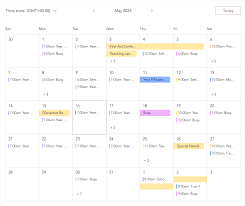
The Importance of an Event Calendar for Your Organization
Events play a crucial role in the success of any organization. Whether it’s a conference, workshop, webinar, or networking session, events provide valuable opportunities for engagement, learning, and networking. To effectively manage and promote these events, having a well-organized event calendar is essential.
Benefits of an Event Calendar
An event calendar serves as a central hub for all your organization’s upcoming events. It provides a clear overview of what’s happening and when, allowing both internal teams and external stakeholders to stay informed and plan accordingly. Here are some key benefits of having an event calendar:
- Organization: A centralized event calendar helps you keep track of all your events in one place, making it easier to manage schedules and resources.
- Promotion: By publishing your event calendar on your website or sharing it via email newsletters and social media, you can effectively promote your upcoming events and attract attendees.
- Engagement: An interactive event calendar can encourage audience engagement by allowing users to register for events, set reminders, and share event details with others.
- Coordination: For organizations hosting multiple events or recurring activities, an event calendar helps in coordinating logistics, avoiding scheduling conflicts, and ensuring smooth execution.
Tips for Creating an Effective Event Calendar
To make the most out of your event calendar, consider the following tips:
- Include Key Details: Make sure each event listing includes essential information such as date, time, location, description, registration link, and contact details.
- Update Regularly: Keep your event calendar up-to-date with the latest information on upcoming events as well as any changes or cancellations.
- Categorize Events: Organize events into categories or tags to help users easily find relevant events based on their interests or preferences.
- Integrate with Other Tools: Consider integrating your event calendar with other tools such as email marketing platforms or CRM systems to streamline communication and data management.
Conclusion
An event calendar is more than just a schedule – it’s a powerful tool for planning, promoting, and managing events effectively. By investing time and resources in creating an organized and user-friendly event calendar, your organization can enhance its visibility, engagement levels, and overall success in hosting impactful events.
9 Essential FAQs About Creating and Managing an Event Calendar
- What is an event calendar?
- How do I create an event calendar for my organization?
- What information should be included in an event calendar?
- How can I share my event calendar with others?
- What are the benefits of using an online event calendar?
- How do I integrate my event calendar with other tools or platforms?
- Can I set reminders or notifications for events on the calendar?
- How do I update or edit events on my calendar once they are published?
- Are there any recommended software or apps for managing an event calendar?
What is an event calendar?
An event calendar is a visual representation or digital tool that displays a schedule of upcoming events, activities, or occasions within a specific timeframe. It serves as a centralized platform where individuals and organizations can view, plan, and manage various events conveniently. Event calendars typically include details such as event titles, dates, times, locations, and descriptions to provide users with essential information about each event. By offering a comprehensive overview of scheduled events, an event calendar helps users stay organized, informed, and engaged with upcoming opportunities for networking, learning, or entertainment.
How do I create an event calendar for my organization?
Creating an event calendar for your organization is a straightforward process that involves a few key steps. First, determine the platform or tool you will use to build and manage your calendar, such as a website plugin, calendar software, or online service. Next, gather all relevant information about your upcoming events, including dates, times, locations, descriptions, and any registration details. Input this information into the calendar tool and customize the design and layout to align with your organization’s branding. Finally, promote your event calendar through various channels to ensure maximum visibility and engagement among your target audience. By following these steps thoughtfully and systematically, you can create an effective event calendar that helps streamline event planning and promotion for your organization.
What information should be included in an event calendar?
When creating an event calendar, it is essential to include key information that helps users understand the details of each event. This typically includes the event’s date, start and end times, location or venue, a brief description of the event, any registration or ticketing information, contact details for inquiries or RSVPs, and any relevant links such as to a registration page or event website. Providing this comprehensive information not only helps potential attendees plan their schedules but also ensures clarity and transparency in communicating event details effectively.
How can I share my event calendar with others?
Sharing your event calendar with others is a simple yet effective way to promote your upcoming events and increase attendance. There are several methods you can use to share your event calendar with a wider audience. One common approach is to publish your event calendar on your organization’s website, making it easily accessible to visitors who are interested in attending your events. Additionally, you can share the link to your event calendar via email newsletters, social media platforms, and event listing websites to reach a broader audience and attract potential attendees. By making your event calendar readily available and easy to share, you can maximize visibility for your events and drive engagement among your target audience.
What are the benefits of using an online event calendar?
Using an online event calendar offers numerous benefits for individuals and organizations alike. One key advantage is the accessibility it provides, allowing users to view, register for, and interact with events from anywhere with an internet connection. Online event calendars also offer real-time updates and reminders, helping users stay informed about upcoming events and deadlines. Additionally, these digital platforms often feature customization options, search functionalities, and integration capabilities with other tools, enhancing user experience and overall event management efficiency. By utilizing an online event calendar, users can streamline event planning processes, increase attendance rates, and create a more engaging and interactive experience for participants.
How do I integrate my event calendar with other tools or platforms?
Integrating your event calendar with other tools or platforms is a common query among event organizers seeking to streamline their processes and enhance efficiency. To achieve this integration, you can explore various options depending on the tools you use. Many event calendar platforms offer built-in integrations with popular tools such as email marketing software, customer relationship management (CRM) systems, and social media platforms. Additionally, utilizing application programming interfaces (APIs) or third-party integration services can help establish seamless connections between your event calendar and other essential tools, allowing for automated data sharing, improved communication, and enhanced overall functionality across different platforms. By leveraging these integration capabilities effectively, you can create a cohesive ecosystem that optimizes event management and maximizes the impact of your events.
Can I set reminders or notifications for events on the calendar?
One frequently asked question about event calendars is whether users can set reminders or notifications for events. Having the ability to set reminders or receive notifications for upcoming events is a valuable feature that enhances user experience and ensures that important events are not missed. By enabling users to customize their preferences and receive timely alerts, event calendars can help individuals stay organized, plan their schedules effectively, and actively engage with the events they are interested in attending. This feature adds convenience and functionality to event calendars, making them more user-friendly and efficient tools for managing events and maximizing participation.
How do I update or edit events on my calendar once they are published?
To update or edit events on your calendar once they are published, you can follow a few simple steps. First, log in to the platform or tool where your event calendar is hosted. Locate the specific event you want to update and look for an “Edit” or “Modify” option next to it. Click on this option to access the event details, where you can make changes such as updating the date, time, location, description, or any other relevant information. After making the necessary edits, be sure to save your changes to ensure that the updated event information is reflected accurately on your calendar for all users to see.
Are there any recommended software or apps for managing an event calendar?
When it comes to managing an event calendar, there are several recommended software and apps available that can streamline the process and enhance organization. Popular choices include platforms like Google Calendar, Microsoft Outlook Calendar, and Apple Calendar for their user-friendly interfaces and integration capabilities with other tools. Event-specific software such as Eventbrite, Cvent, and Meetup offer features tailored to event management, including registration, ticketing, and attendee engagement. Additionally, project management tools like Trello and Asana can be adapted for creating and tracking event calendars within a team setting. Choosing the right software or app depends on your organization’s specific needs and preferences in terms of functionality, collaboration options, and scalability.
Related Post

Driving Innovation: The Evolution of Automotive Industries
The Impact of Automotive Industries on Global Economy The Impact of Automotive Industries on Global [...]
Empowering Communities: Building Connections and Driving Change
The Importance of Communities in Today’s Society Communities play a vital role in shaping our [...]